Frequently Asked Questions
Answers to common questions about the server, its features, and how to participate.
Jump to your question
Spot your issue below and click straight to it.
Getting Started & Server Basics
Cams, Voice & Discord
Auto-Driving Stimbot
Live Sessions & Sunday Drives
e l e c t r o n, Software & Sound
Getting Started & Server Basics
How do I verify my age to get access?
Go to the #age-verification channel and click the ✅ checkmark reaction on the post.
How do I get or remove roles like "Driver" or "Pup"?
You can toggle all self-assignable roles on and off in the #role-select channel by clicking on the corresponding emoji reaction.
How do I invite someone to the server?
You can send them this permanent invite link: https://discord.gg/VXYYduDX4T
Do I need gear to enjoy the server?
Not at all! Many members are here to discuss gear, meet people, watch cam sessions, or hang out. You only need a power box and electrodes when you actually want to ride. Curious newcomers are very welcome, and the community is generally happy to answer questions about getting started with the hobby.
I can't access the server on my iPhone/iPad. What do I do?
Apple restricts access to certain 18+ Discord servers through the native iOS app. If you're being blocked, the fix is to log into Discord on a desktop or laptop, enable the server's age-restricted content access there, and then try again on your device. Alternatively, using the web-based version of Discord (discord.com in a mobile browser) bypasses the iOS app restriction entirely.
What is the "@VC Ping" role and what does it do?
The @VC Ping role is an opt-in notification role. Members with it will get pinged when someone starts a cam/voice session and wants company. Grab it from #role-select if you want to be notified. The @In-A-VC role is automatically applied when you're in a voice channel, making it easy to see at a glance who is currently active.
Voice & Cam Channels
How do the different voice/cam channels (#stimroom, #Auto Driving, etc.) work?
The server has two main types of voice channels (VCs), and it's important to know how each one uses audio. Everyone you see in a channel is a fellow member of the server.
1. Channels for Normal Audio (Mics & Headphones)
These channels use Discord's audio for normal conversation. You set your Discord output to your headphones/speakers to talk to and hear other users. They are generally for stimming alone or with a shared signal generated outside of Discord (like in a web browser with e l e c t r o n). These channels include:
#stimroom#b8-pump-hangout#Sunday Drive
The `Sunday Drive` event specifically uses this method so the driver can hear your moans and groans.
2. Channels for Stim Audio (Power Box Output)
These channels use Discord's audio to broadcast a stim signal directly. You must change your Discord audio output to your stim box to receive the signal. These channels include:
#Auto Driving#The Arcade
What is The Arcade?
The Arcade is a special voice channel for playing e-stim-compatible games via screen sharing. A member shares a game on screen and uses a service like XToys or software like restim that translates in-game events into live e-stim signals delivered through the channel's audio. Similar to how Auto Driving works, you will need to set your Discord output device to your power box to receive the signal. See the Guides page for setup instructions.
Do I need to have my camera on?
No. The mandatory "cams on" rule was lifted in 2024. Cameras are entirely optional in all channels. That said, cams are always welcome and encouraged — drivers especially love being able to see their riders, and it creates a much more interactive experience for everyone.
My camera isn’t working, or people can’t see me. How do I fix it?
Almost every cam issue we see traces back to running Discord in a web browser. The native Discord app handles cameras and voice significantly better — it uses a tuned WebRTC pipeline and OS-level permissions that don’t silently break. Install the native Discord app (desktop or mobile) and most problems disappear.
Full client reliability ranking (best → worst):
- 1.Discord desktop app (Windows / Mac / Linux) — best. Tuned WebRTC, OS-level permissions.
- 2.Discord mobile app (iOS / Android) — also native, also excellent.
- 3.Chrome on desktop — best of the browsers. Chromium’s WebRTC is the one Discord tests against most.
- 4.Edge — essentially Chrome under the hood, works fine.
- 5.Opera / Brave / Arc — Chromium-based, usually OK but extensions/shields can break WebRTC.
- 6.Firefox — known Discord issues, especially with cam detection.
- 7.Safari — Discord barely supports it, cam often just doesn’t appear at all. This includes Chrome on iPhone/iPad, which runs on Safari’s engine due to Apple’s WebKit requirement.
If you’re stuck in a browser, also try:
- Disable browser extensions that touch privacy, ads, or WebRTC — they often break camera/voice negotiation silently.
- Check your browser’s camera permissions in site settings. They can silently revoke themselves after browser updates, especially in Chrome.
I can’t see other people’s cameras, or I get Error 2012. How do I fix it?
This is the flip side of the entry above — not your own cam failing, but other people’s cams refusing to load for you (a black tile, or Error 2012). It’s almost always a network or cache problem on one end — and there’s a quick way to tell whose end.
First, work out whose end it is
Many / all cams fail
It’s your end — a network or cache issue on your side. The fixes below are for you.
Only one cam fails
It’s almost certainly that person’s end — nothing you can fix. They may need to reconnect or switch to the app.
If it’s your end, in order:
- Use the Discord app, not a browser. The single most common fix — the native app loads cams far more reliably than any browser (see the entry above for the full client ranking).
- Turn off your VPN. VPNs are a frequent cause of 2012 — cams that wouldn’t load often appear the moment you disconnect.
- Clear your Discord cache and check your connection is stable. A stale cache or a weak/flaky connection both throw 2012. (Steps just below.)
- Old, slow hardware can contribute — an aging machine with a spinning hard drive struggles to decode several video streams at once.
How do I clear my Discord cache?
A stale cache is behind a lot of cam glitches, Error 2012 included. Clearing it just makes Discord rebuild fresh files next time it opens — you won’t lose messages, servers or settings. Pick your platform.
Windows (desktop app)
- Fully quit Discord — right-click its icon in the system tray (bottom-right, by the clock) and choose Quit Discord. Closing the window isn’t enough; it keeps running in the tray.
- Press Win + R, type
%appdata%\Discordand press Enter. - Delete the
Cache,Code CacheandGPUCachefolders. - Reopen Discord — it rebuilds them automatically.
Mac (desktop app)
- Quit Discord completely with Cmd + Q.
- In Finder press Cmd + Shift + G, paste
~/Library/Application Support/discord/and press Enter. - Delete the
Cache,Code CacheandGPUCachefolders. - Reopen Discord.
On mobile
Android: your phone’s Settings → Apps → Discord → Storage, then Clear Cache. Clear cache, not data — clearing data logs you out and wipes the app. iPhone: open Discord’s User Settings (tap your avatar, bottom-right) and look for Clear Cache under App Settings; if your version doesn’t have it, offload the app via iOS Settings → General → iPhone Storage → Discord → Offload App, then reinstall.
I was muted during a session. Why, and how do I get unmuted?
You haven’t done anything wrong. Server mutes happen when background noise — a television, a tumble dryer, a chatty housemate, a pet — is coming through your mic loudly enough to disrupt everyone else in the channel. It’s not a ban or a warning; it’s housekeeping.
Getting unmuted
eSSDrone (the server bot) will offer to unmute you automatically the next time you join a voice channel. Follow his prompt and you’re back in.
How to mute your own mic before it comes up
PC & Mac
Bottom-left corner of Discord, next to your username — click the microphone icon to toggle mute on and off.
iOS & Android
While in a voice channel, tap the microphone icon at the bottom of the screen.
If the noise resolves itself mid-session, just self-mute until it does — Sir Thorn or eSSDrone will unmute you once things settle.
The stimroom looks empty or quiet. What's it actually for?
The stimroom is the server's most active video channel — but it's busiest during events and evenings. If it seems quiet, you may just be catching it at a slow moment. People often join with their cam off while running a session through e l e c t r o n or another signal source in the background. Jump in, say hi in chat, and you'll often find others lurking. The #hookup text channel (under Cam Rooms) is the place to post a text request if you're actively looking for a driver or a riding partner.
The 24/7 Auto-Driving Stimbot
How does the Auto-Driving Stimbot work?
The bot streams a 24/7 audio signal of pre-recorded e-stim files directly into the "Auto Driving" voice channel. You can connect to this signal and ride anytime you want.
The Stimbot isn't working or there's no sound. What should I do?
The bot sometimes goes offline for maintenance or due to Discord issues. If it's not working, please mention it in the #help channel. A moderator will restart it as soon as possible.
Why can't I talk in the Auto-Driving channel?
This is intentional. Microphones are disabled for members to ensure the stim signal remains clean and uninterrupted for everyone riding. You can use the text chat attached to the voice channel to communicate with others.
Can I vote to skip the current file?
Yes! Use /next in the Auto Driving channel's text chat to cast a vote. The required votes scale with the number of riders: 1 rider skips immediately, 2 riders need both to vote, 3+ riders need a majority. Use /nowplaying to see what's currently playing. The bot also pauses automatically when the channel is empty.
Can I submit my own e-stim files to the Stimbot library?
Yes! Community submissions are what keep the library fresh. Post links or files in the #jukebox-suggestions channel. You can also submit .json files there to be added to the e l e c t r o n jukebox rotation.
Live Sessions & Sunday Drives
How are live sessions (like Sunday Drive) different from the Stimbot?
For live sessions, the audio comes from an external webpage like e l e c t r o n, not directly through Discord's voice chat. The driver posts a unique link in the channel. You open that link in a browser and route your browser's audio to your stim box. Your Discord audio is set to your normal mic and headphones so you can talk with other participants.
What is the Sunday Drive exactly?
The Sunday Drive is the server's flagship weekly live event, hosted every Sunday at 7:30 PM UK Time. Sir Thorn drives a live e l e c t r o n session shared in the Discord channel. It's a communal experience — riders join via voice, cams are welcome, and the driver interacts with the room. It has been running consistently since 2021 and is now well past its 150th episode.
What is a recommended electrode setup for Sunday Drives?
A common suggestion for tri-phase is Channel A (Left) on the cock, Channel B (Right) on/in the ass, and the common/negative electrode behind the balls. This is not a strict rule; you are encouraged to experiment to find what works best for you.
Can I host my own live drive on the server?
Yes! The server welcomes community drivers. If you're interested in hosting a session, reach out to a mod or post in the server to express your interest. You can use our hosted e l e c t r o n instance to run your session — it's free and always available.
How do I find people to play with?
The primary way is to post in the #hookup channel to state you're looking for a partner. People also frequently hang out in the general voice/cam channels like #stimroom. You can also use the @VC Ping role to get notified when sessions start.
Software & Hardware
I can feel Discord's notification pings / beeps in my box during a ride. How do I stop that?
Discord's own UI sounds (message notifications, join/leave beeps, etc.) will be routed to your stim box along with the stim signal if you've set Discord's output to your box. To stop this, go to User Settings (the cog icon by your name) → Notifications → scroll down to Sounds under APP SETTINGS → turn all the green toggles to grey. This mutes only the UI sounds; the stim signal is unaffected.
What is e l e c t r o n?
e l e c t r o n is a powerful, web-based tool for creating and playing e-stim audio signals, often used by drivers for live sessions. Our server hosts its own official version which you can find in the navigation bar. The eStimStation instance includes extra features like pause, stop, and session scrubbing — and it's free to use forever.
What is XToys?
XToys is a web-based app that lets you control various e-stim and sex toys from your browser. On this server it's most commonly used for controlling a DG-Lab Coyote from an e l e c t r o n session's audio signal, or any other audio-based driving source (like the 24/7 StimBot in the Auto Driving channel). See the Coyote guide for detailed setup instructions.
My antivirus says the XToys Utilities are a virus. Is it safe?
This is a known false positive. The XToys utilities are flagged because, by design, they need to monitor low-level system processes to work. The community and developers consider it safe. The recommended solution is to temporarily disable your antivirus software to complete the installation.
I'm getting a flat line / no signal on e l e c t r o n. How do I fix it?
First, make sure you've clicked the "Click here to start audio" button on the player page — browsers block audio from playing automatically, and nothing will come through until you've interacted with that prompt. If you've done that and are still seeing a flat line, it usually means the audio connection has stalled. Try refreshing your browser (Ctrl+F5 / Cmd+Shift+R) — this forces e l e c t r o n to re-establish the audio stream. If you're a rider in a live session, the driver can also trigger a refresh by adjusting any setting slightly, which pushes a new signal update to all connected riders. If the problem persists, check that your browser's audio output is set to the correct device.
What can I control as a rider in an e l e c t r o n session? Does the driver control everything?
e l e c t r o n uses a "Follow the Leader" system. The driver controls the master state — when they adjust a slider or change a pattern, your screen automatically syncs to match. This ensures everyone feels the same rhythm at the same time. However, you are always in charge of your own safety: you can still adjust your own local power levels and disconnect at any time. Think of the driver as a DJ setting the music, and you as controlling your own volume.
Where can I find previously recorded sessions to try solo?
A couple of options. Our Jukebox mode on e l e c t r o n plays a random rotation of community sessions 24/7, so you can just open it and ride. Session packs are also on the Downloads page, which come as .json files you load yourself.
To load a .json you've downloaded: open e l e c t r o n and start a Slay Solo session (or a driving session, if you're driving others). In the Script row near the middle, click Choose file, pick your .json, then hit Load Session. That's it, it's queued and ready to go.
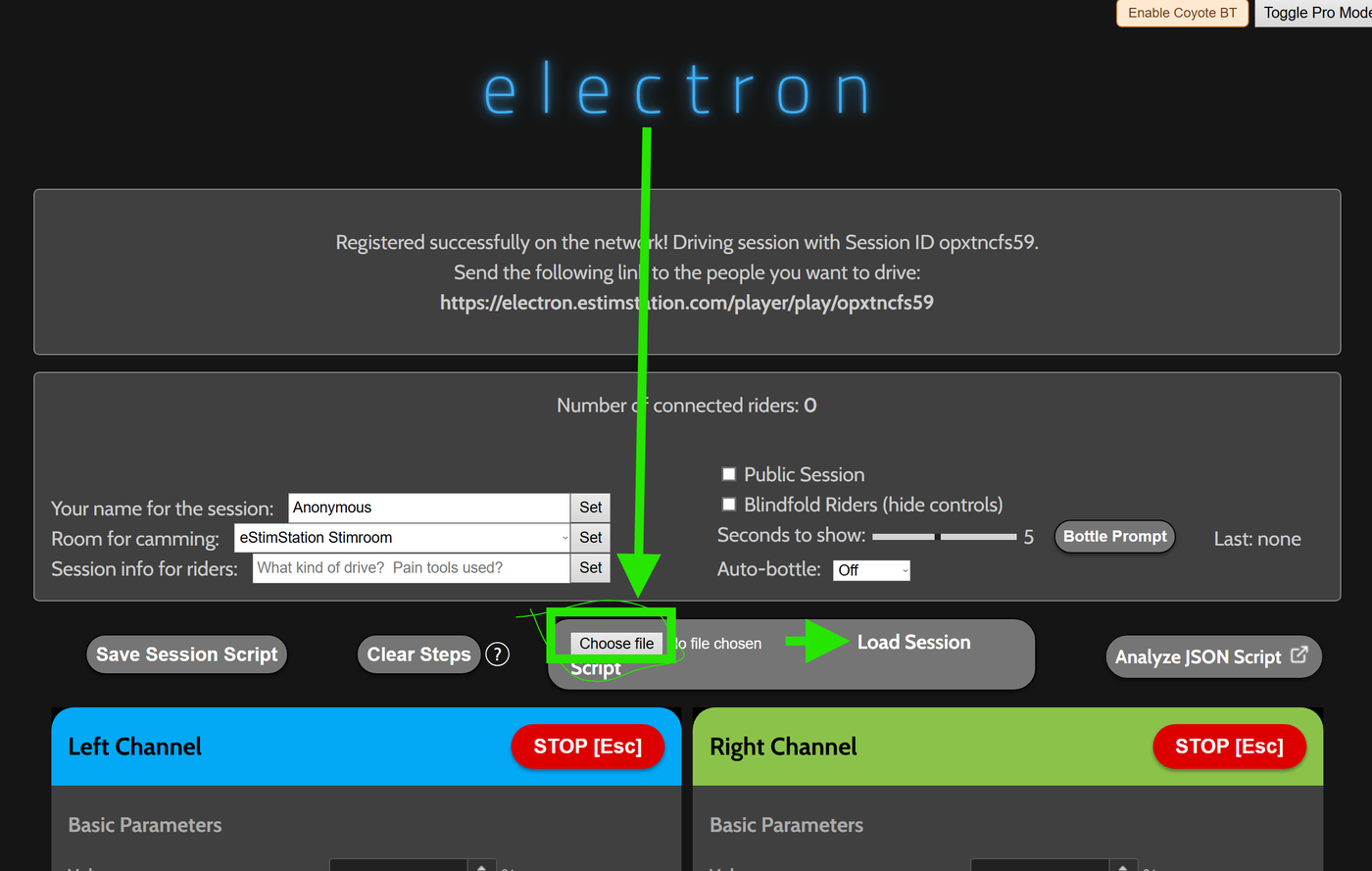
.json, then Load Session.I'm on a Mac — how do I route e l e c t r o n's audio output to my stim box?
It depends on your setup. If you're plugging a standard audio box (like the 2B) directly into your Mac's headphone jack, Discord and e l e c t r o n both let you select your output device natively — just pick the correct audio output in the app's audio settings and you're good to go, no extra software needed.
The virtual audio driver step only applies if you're trying to route audio into XToys — for example, to drive a DG-Lab Coyote from e l e c t r o n's signal or from the auto-driving Stimbot channel. macOS won't let one app send audio into another without a virtual driver in between. Two common options are Blackhole (free, open source) and Loopback (paid, from Rogue Amoeba). Once installed, you create a virtual audio device, set your browser or Discord to output to it, and then configure XToys to receive from it. Blackhole has some single-channel limitations that can affect certain setups — Loopback tends to be more flexible. If you're struggling, post in #help with your box model and Mac setup.
Does e l e c t r o n / Sunday Drive work with FOC / ReStim?
Not through e l e c t r o n, no. e l e c t r o n is built around audio-based signal delivery (2B, ET-312, etc.) and Bluetooth bridging via XToys (Coyote). The FOC box and its ReStim software talk over their own connection rather than Discord audio, so e l e c t r o n doesn’t drive them.
If you want remote FOC/ReStim sessions, that’s exactly what ReDrive is for — a driver controls your ReStim from their browser in real time. See the ReDrive guide.
What is e-Stim Connect / e-stim.online?
E-Stim Connect is a web-based tool by E-Stim Systems that allows remote control of the E-Stim Systems 2B power box over the internet. A driver can control your box directly, making it a popular choice for private sessions — Sir Thorn supports it for private drives. It requires a special cable (available from E-Stim Systems) to connect the 2B directly to your computer.
Does e l e c t r o n support SmartStim (.smrtstm4) files?
Yes, with some limitations. e l e c t r o n has rudimentary SmartStim file support — it covers the features used in most archived content, but doesn't replicate all of SmartStim's ramping behaviour. You can load .smrtstm4 files directly in e l e c t r o n's Slay Solo mode. If you need the full SmartStim application itself, the Stimaddict Google Drive (shared in the server) has a copy of the installed software along with setup instructions.
What are the popup prompts that appear during JSON file playback in e l e c t r o n?
Some JSON files include timed "prompt" markers — often used for poppers, commands, or edge cues — that are embedded by the file's creator. When e l e c t r o n hits one of these markers during playback, it shows a full-screen modal overlay that you cannot miss. You'll see them appear automatically at the right moment; no special setup is needed.
Does e l e c t r o n work on Linux?
Yes — e l e c t r o n is a web app, so it runs in any modern browser including on Linux. If you want to use XToys as a Coyote bridge, that's where it gets trickier: XToys Utilities don't have a native Linux build, and running them under Wine hasn't worked reliably. The practical workaround members have used is a Windows 10/11 VM (e.g. VirtualBox) for XToys only, while keeping everything else on Linux.
Gear & Power Boxes
What power box do I need for the Auto-Driving channel?
Any power box that accepts an audio (3.5mm stereo) input will work — the E-Stim Systems 2B, E-Stim Systems ABox Mk2, ErosTek ET-312, and many others all support this. You route Discord's audio output directly to your box. The DG-Lab Coyote can also be used: either via XToys as a bridge, or connected directly through e l e c t r o n's built-in Coyote support.
What is the DG-Lab Coyote?
The Coyote is a popular Bluetooth e-stim device known for being compact and relatively affordable. Because it's Bluetooth-only, it doesn't accept audio input directly — but there are now two ways to use it with the server. You can pair it through e l e c t r o n directly in your browser (no extra software needed), or bridge it via XToys. Some members find XToys gives a smoother ride; others prefer e l e c t r o n's direct connection — it's personal preference. See the Coyote setup guide for both methods.
Can I use a regular TENS unit?
Standard TENS units are designed for pain management and operate at fixed, low frequencies. While some people use them for e-stim play, they generally lack the frequency range, audio input support, and fine control that dedicated e-stim boxes offer. They can work for basic experimentation but will be limited compared to purpose-built devices.
My Coyote V3 feels much weaker than expected. What's wrong?
The DG-Lab app ships with a "Gentle" frequency balance mode enabled by default, which significantly limits output power. To fix it: open the DG-Lab app, tap the grid icon in the top right, go to Frequency Balance, and change it from Gentle to Standard. Also make sure you haven't accidentally left the soft power limit at zero after a reconnect — check your max level sliders.
My Coyote won't connect reliably to e l e c t r o n. What should I try?
Bluetooth can be finicky — especially when the Coyote has previously been paired to another device. Try these steps in order: (1) Disconnect from any other devices (phone, PC app) before connecting to e l e c t r o n. (2) Disconnect and reconnect in e l e c t r o n — sometimes it takes a second attempt. (3) Check that your soft limit wasn't reset to zero after reconnecting; raise it if so. (4) DG-Lab has a Bluetooth connection test page at dungeon-lab.com/bluetooth.html (Chrome required) to help diagnose general Bluetooth issues. If e l e c t r o n has problems but XToys doesn't, it may be a browser permissions quirk — try resetting permissions in your browser settings.
My Coyote keeps disconnecting partway through a session. Why?
Usually your phone screen going to sleep. The phone suspends the DG-Lab app in the background and the Bluetooth link dies with it, which looks like the Coyote dropping out on its own. Keeping the screen awake fixes it: on iPhone set Settings › Display & Brightness › Auto-Lock to Never, and on Android use a keep-awake app since the built-in timeout usually caps out around 5 or 10 minutes. Turn your brightness down while you do it. You can also lock out touch input so you don't knock a setting by accident mid-session. Full walkthrough for both phones on the Coyote troubleshooting page. If it only comes back after you power-cycle the Coyote itself, that's a different fault: the unit stopped advertising rather than the phone losing it, so check for a firmware update in the DG-Lab app.
Can I attach both leads from the same Coyote channel to the same electrode?
No — this will short out that channel and can damage your device. Each channel has two leads (+ and −), and they must connect to separate points. A safe wiring approach is to use one lead from each channel as a shared "common" electrode, with the other leads connecting to separate target electrodes. If you're unsure, ask in #help before experimenting.
How do I troubleshoot which audio output my 2B is connected to?
A quick way to test is to use VLC Media Player — go to Audio → Audio Device and switch between output devices while playing any audio file. When you find the device that makes the 2B react, that's the one to set in Discord's Voice & Video settings. Plugging a pair of headphones into the same 3.5mm jack also works as a quick sanity check to confirm audio is reaching it.
What's the best power box for a beginner?
There's no single "best" answer, as it depends on budget and goals. The community frequently discusses gear in our dedicated gear channels. The E-Stim Systems ABox Mk2 and DG-Lab Coyote are often recommended as entry points. If you'd like to jump deeper into the hobby, the E-Stim Systems 2B is considered by many to be a decent choice for audio-driven play, while the ErosTek ET-312 is another highly regarded box. There are also several newer power boxes being released regularly, so feel free to ask in the server — our members love talking gear!